
Partial shipments are where order tracking pages lose people. A shopper sees one box on the way, one item delayed, and one more line item with no clear date. That gap turns into WISMO tickets fast.
A strong partial shipment tracking experience answers the whole order in one glance. It shows what shipped, what is delayed, and what still needs attention, before a customer has to ask support.
Why partial shipment tracking creates WISMO
When a tracking page only shows carrier scans, customers do the mental work themselves. They compare emails, count items, and guess which package holds what. That creates doubt, and doubt leads to tickets.
Support teams feel it in the same questions over and over. “Did my missing item ship?”, “Why do I have two tracking numbers?”, and “Will the rest come later?” all come from the same gap. If the page does not answer those questions, support becomes the fallback.
The copy has to do more than report movement. For message design, shipping status messages that reduce WISMO are a good reference because they explain what happened, what comes next, and whether the customer needs to act.
That is the real job of the interface. It should calm the shopper before they open another tab or send another email.
Build a page that answers three order questions
The best tracking page feels like a clean order summary, not a carrier report. Put the key answers at the top: what shipped, what’s delayed, and what remains. If someone lands on mobile, those answers need to appear before the first scroll.
A clear top section might show “3 of 5 items shipped” with a next delivery date beside it. Under that, list each item with its own status chip and ETA. Group items by package when you can, because that matches how the order will arrive.
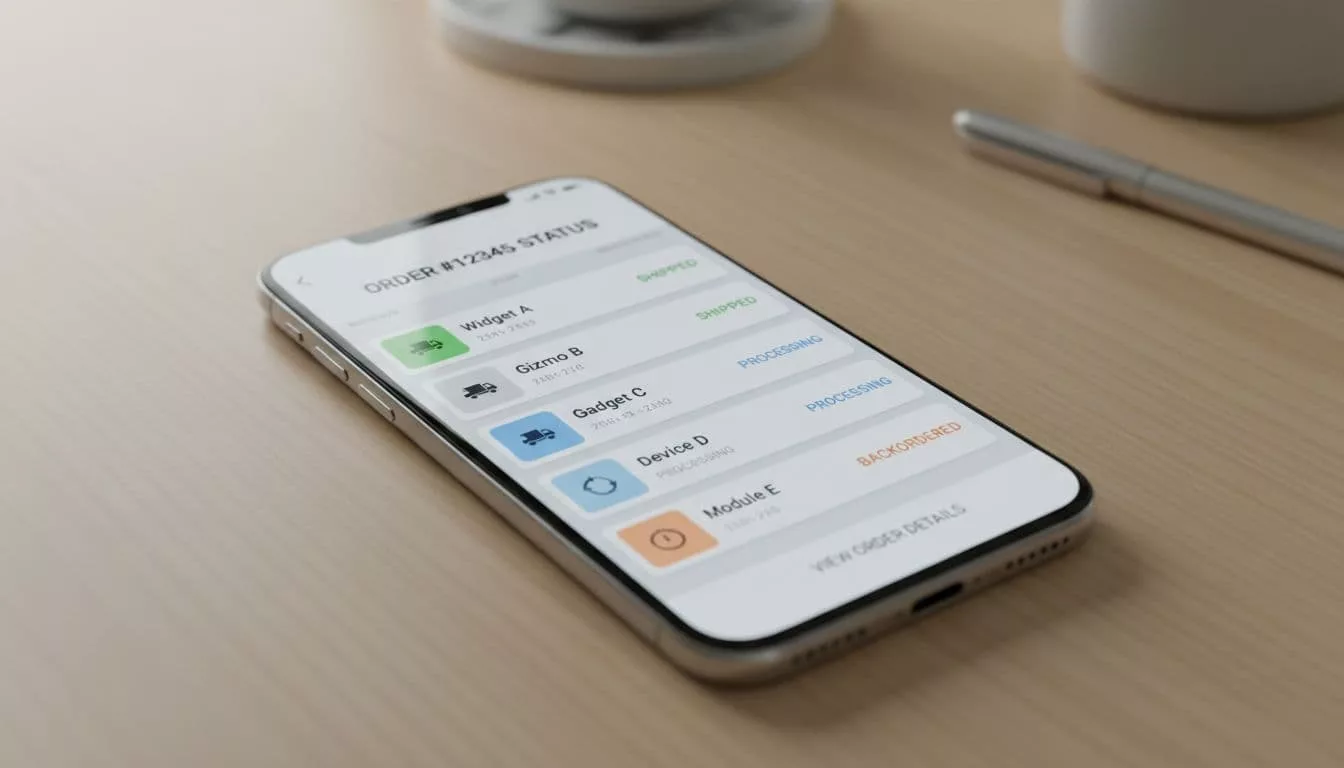
A timeline works best when it stays simple. Start with the order, then split into package-level branches once fulfillment begins. That makes the page easy to scan and easier to trust. A good reference for the portal layer is branded tracking portal UX, especially if you want the experience to feel consistent with the rest of the store.
If you want a broader pattern for the page structure, see order tracking UX that cuts WISMO tickets.
The rule is simple. A shopper should not need to decode your warehouse logic. They should know, in seconds, what is moving and what is still waiting.
Status language that makes split orders easy to read
The fastest way to calm a shopper is to stop sounding like a scanner. Replace vague labels with short sentences that describe the order, the package, and the next step.
Here is a practical way to write better states:
| Situation | Weak status | Better status |
|---|---|---|
| One package shipped, one item pending | Partially shipped | 2 of 4 items shipped, 1 item is still processing |
| Carrier delay | Exception | Your lamp is delayed at the carrier hub, new ETA Thursday |
| Backordered item | On hold | The replacement charger is backordered, expected to ship May 20 |
| Canceled line item | Cancelled | The green mug was canceled and will not ship |
| Separate delivery dates | In transit | Package 1 arrives Tuesday, package 2 arrives Friday |
These lines work because they name the item, the state, and the date. They also reduce the urge to contact support for a translation.
If the label sounds like a warehouse term, rewrite it. If a customer cannot act on it, it is not done yet.
The copy should also stay honest when data is incomplete. Say “estimated” when the date can move. Say “carrier scan pending” only if that helps the customer understand the delay. Anything else feels like a shrug.
Edge cases that need special handling
Multiple carriers need package-level tracking, not one blended status. Show each shipment in its own card with the carrier name, items inside, and expected delivery date. If one box is delayed, say that plainly so the other box does not look suspicious too.
Backordered items and pre-orders need date ranges, not vague promises. A line like “Ships on or after May 20” is better than “processing.” If the date changes, update the page and the notification at the same time. Customers get frustrated when the page and email disagree.
Canceled line items should stay visible long enough to explain the refund or replacement. Do not hide them, because hidden items create more confusion than canceled ones. A short note, such as “This item was canceled and will not ship,” stops a lot of follow-up messages.
Separate delivery dates also need a clear layout. Put the date beside each package, not buried in a feed. If a customer sees three different dates, the UI should help them map each one to the right item.
This is where shipping status messages that actually reduce support tickets matter, because one message rarely fits every shipment state. Partial fulfillment needs item-level clarity, not a generic “your order is on the way” note.
Notifications and support deflection that actually work
Tracking pages reduce tickets, but notifications keep the load from coming back. Use a tight sequence: order confirmed, shipment split, shipped, delay, and delivered. If a line item changes later, send one targeted update for that item only.
Email is best for detail. It can show the item list, package status, and ETA in a format people can scan later. SMS should stay short. It should say what changed and link back to the order page.
A shipment-split alert can be simple: “2 items shipped today, 1 item is backordered, next update on Friday.” That is far more useful than a generic shipping notice. It gives the customer context without forcing a support reply.
Support deflection works best when the page offers a next step before the customer gets frustrated. Add a clear “Report an issue” link near each package, not just at the bottom of the page. If the issue is still unclear, route it through a better contact page UX with labels that match customer intent.
A small FAQ block also helps. Keep it close to the tracking summary and answer the same questions support hears every day. “Why did my order split?” and “Why does one item have a later date?” belong there, not in a separate help center maze.
Measure whether the new flow is doing its job
A good tracking page should pay for itself in fewer tickets. Watch WISMO tickets per 100 orders, repeat contacts on split shipments, tracking page exits, and self-service clicks on item-level tracking.
Also look at post-purchase satisfaction after delay events. If customers who see partial shipment updates still contact support, the problem is usually copy or layout, not carrier data. In many cases, the answer is a clearer status line or a better package grouping.
Compare orders with one shipment against orders with partial fulfillment. That split matters because a page can look fine in a normal order and still fail on the messy ones. The goal is lower confusion, shorter handling time, and fewer “where is the rest of my order?” messages.
If the numbers improve, the UX is working. If they do not, revise the statuses first, then the layout, then the alerts. That order saves time.
Conclusion
Partial shipment tracking works when it removes interpretation. Customers should see what shipped, what is delayed, and what still sits in the queue without reading between the lines.
When the page, alerts, and support routes all say the same thing, the inbox gets quieter. That is the point of good post-purchase UX, fewer guesses, fewer WISMO tickets, and a lot less confusion after checkout.