

Large stores do not struggle because they lack data. They struggle because the data is noisy, spread across teams, and hard to trust. Ecommerce log file analysis cuts through that noise by showing what bots and crawlers actually request, not what you assume they request.
That matters more in 2026. AI-driven search brings longer query patterns, rendering-heavy templates put more pressure on servers, and seasonal inventory changes can turn a clean crawl path into a mess within days. The logs show where crawl budget goes, which templates waste it, and which pages deserve more attention.
Why large stores need log analysis now
Large ecommerce sites are full of traps that only show up at scale. Category pages, product detail pages, filter combinations, site search results, and promo landing pages all compete for crawl attention. A crawler can spend hours on low-value URLs while revenue pages wait.
Logs give you the actual path. That makes them better than assumptions from a crawler alone, because they include live bot visits, response codes, and frequency. They also expose how Googlebot, Bingbot, and other crawlers behave when stock changes, a sale launches, or a new template ships.
Start with your main page groups, then compare crawl share against business value. If filter URLs dominate and product pages stay under-read, the site is sending mixed signals. For crawl planning, compare that data with your ecommerce XML sitemaps guide, so your sitemap and crawl patterns point in the same direction.

What the logs should tell you
The best reports separate signal from noise. You want enough detail to spot patterns, but not so much that the team ignores the report. A clean baseline helps you track changes after template releases, merch updates, or crawl-control fixes.
| Signal | What it tells you | Example in a large store |
|---|---|---|
| Crawl mix | Which URL types get the most bot visits | Category pages vs filter combinations |
| Status codes | Where bots hit dead ends or redirects | 404s on retired products, 301 chains |
| Response time | Whether templates slow down crawlers | Heavy product pages with many scripts |
| Parameter depth | How far bots travel into faceted nav | Page 4, page 8, or color plus size combos |
| Bot type | Which crawler spends the budget | Googlebot on index pages, AI crawlers on render-heavy pages |
The table is only useful if you compare it over time. A one-time snapshot can hide a problem that gets worse each week. A monthly workflow like the one in EcomSEO Academy’s log analysis guide keeps the findings tied to action, not just reporting.
A page can rank and still waste crawl if bots keep returning to low-value variants.
This is where bot behavior analysis pays off. If a crawler keeps hitting URLs that no shopper would use, the template is giving it too many paths.
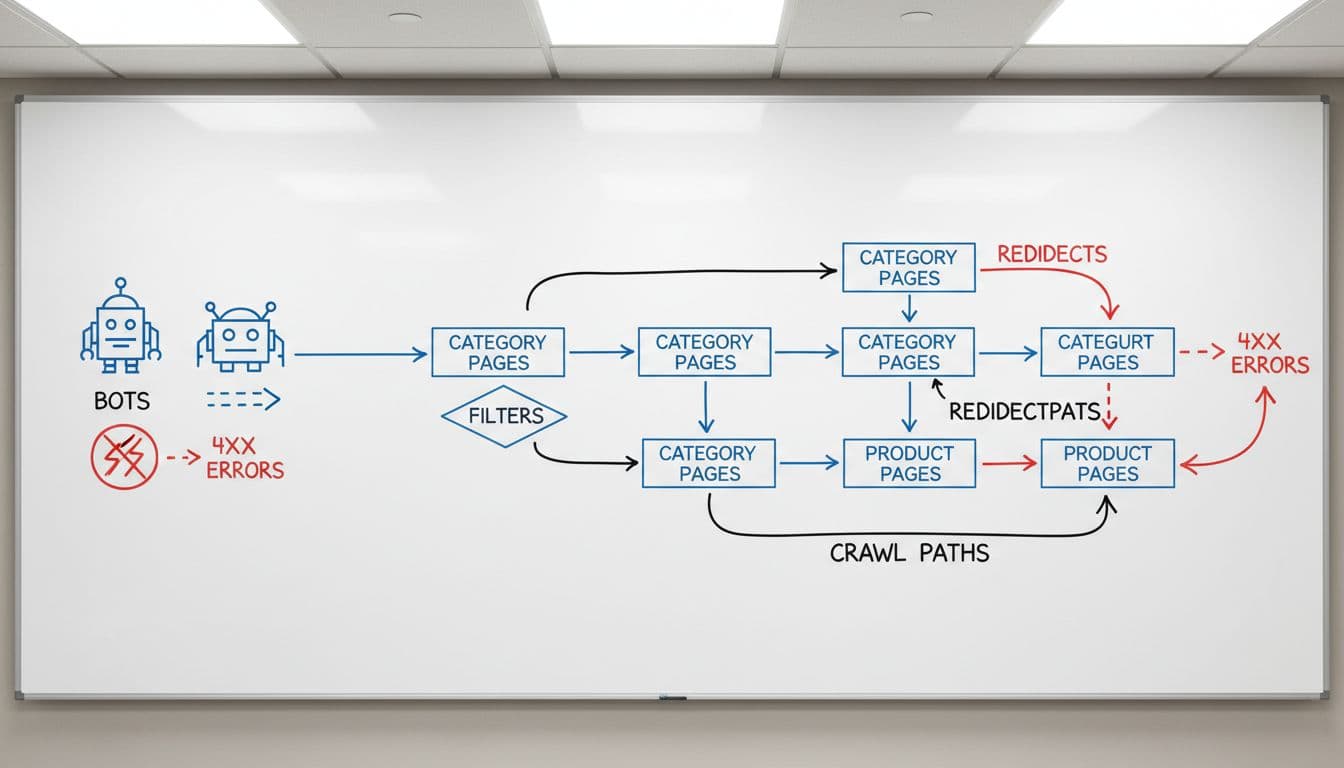
Reading crawl paths across categories, products, filters, and search
Category pages usually deserve the biggest share of crawl. They organize demand, they link deeper into the catalog, and they change less often than product detail pages. If logs show weak crawl on top categories, review the template before you change the whole site.
Product pages need a different lens. A single product can look healthy in Search Console, yet still get poor bot coverage if internal links are weak or if seasonal variants create duplicate URLs. Validate your ecommerce internal linking strategy so important products stay close to the crawl path.
Filter combinations are where many large stores lose control. Size, color, price, brand, material, and rating filters can produce millions of URLs. Some combinations deserve crawl, but most do not. If your logs show bots visiting deep parameter strings, treat that as crawl waste. The pattern is common on large catalogs, and it matches the advice in log file analysis for crawl waste. Site search result pages need even tighter controls, because they often create thin, noisy paths that add little index value.
Seasonal inventory changes add another layer. Out-of-stock products, back-in-stock pages, and holiday landing pages all change the log picture. A product that was crawled daily in November may vanish from the crawl in January. That is normal, but only if the lost crawl is replaced by the right new URLs.
Turning log findings into fixes that scale
The fix list should follow the waste. Start with the URL patterns that soak up the most crawl and the most server time. If the problem sits in faceted navigation, use canonical tags, parameter rules, or noindex where the combination has no business value. If it sits in old product URLs, clean up redirects and remove chains.
Then check server and render costs. AI search, richer media, and heavier page templates can slow bots down before shoppers notice. Pair log data with Core Web Vitals for ecommerce so you can see whether slow responses line up with poor user performance too. That turns log review into server resource optimization, not only SEO cleanup.
Large teams need one shared monitoring view. Pull logs, Search Console, sitemap data, and release notes into the same weekly review. If a new theme, app, or promo launch changes bot behavior, you want to catch it before indexation slips. The best enterprise workflows flag crawl spikes, 5xx bursts, and response-time jumps fast enough to act on them.

If the logs show Googlebot spending time on filters while product and category pages sit quiet, the site is telling you where to work first. Fix the crawl path, and the rest of the SEO job gets easier.
Conclusion
Large-store log analysis is less about finding errors and more about reading behavior. When you track crawl mix, status codes, response time, and parameter depth, the site starts to make sense at scale.
The big win in 2026 is alignment. Your categories, products, filters, search pages, and sitemaps should point crawlers toward revenue, not noise. When that happens, crawl efficiency improves, indexation gets cleaner, and server load becomes easier to control.