A buying guide that ranks but never helps a shopper reach the right product is wasted effort. Good ecommerce buying guide SEO doesn’t stop at traffic.
For store owners and content teams, that means each guide needs a clear job. It should target early and mid-stage questions, support the right collection and product pages, and stay out of the way of pages that already own commercial intent.
The pages that win do this with clean mapping, smart links, and a layout that reduces doubt.
Why buying guides help pages that sell
Buying guides fill the gap between broad research and purchase-ready searches. A shopper who searches “how to choose trail running shoes” isn’t ready for a SKU. However, that same shopper may be close to a collection page once they understand cushioning, terrain, and fit.
That is why guide content should target upper- and mid-funnel intent, then hand off to the right commercial page. A guide can rank for “best trail running shoes for wide feet” while a collection page targets “wide fit trail running shoes” and a product page focuses on one model. Each page has a different promise.
When those promises blur, cannibalization starts. If your collection and guide both chase the same core query, Google has to guess which one matters. Usually, neither page performs as well as it should.
RankPill’s 2026 ecommerce SEO guide makes the same practical point: informational pages often gain traction faster than product pages. That only helps revenue when the guide sends readers toward the right category or product, not into a dead end.
As more shoppers use conversational search and AI assistants, clear language matters even more. Guides should answer real buyer questions, use plain terms, and include scannable specs, FAQs, and review cues that support the next click.
Map search intent before you outline the guide
The outline should come after the page map, not before it. Start with one guide topic, then assign a supporting collection page and a short list of products that fit each section.
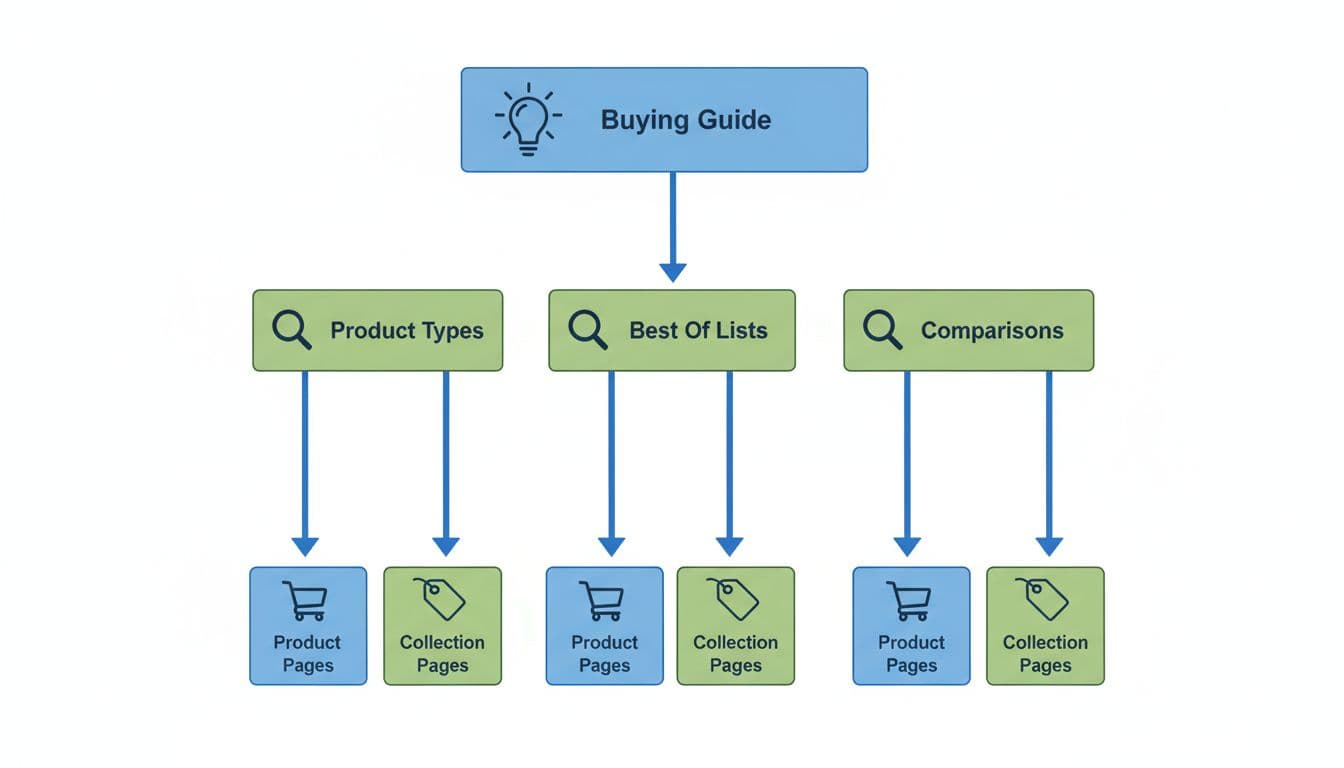
If your guide is about trail running shoes, an H2 on waterproofing should usually link to a waterproof trail shoe collection. A subsection on cold-weather grip can link to two or three models that fit that need. That structure tells search engines what the guide is about, and it tells shoppers where to go next.
If a guide title could swap places with a collection title and still make sense, the two pages are competing.
A simple mapping pass keeps that from happening:
- Give each indexable page one main intent.
- Put advice, comparisons, and decision help on the guide.
- Keep broad shopping intent on the collection page.
- Reserve the exact item, specs, price, and purchase action for the product page.
For large catalogs, reusable content can help. A size-help block, materials explainer, or fit chart doesn’t need its own thin URL on every store. Shopify metaobjects for SEO can keep those modules consistent while letting guides and product pages reuse the same buyer-help content.
Before publishing, check your title, H1, internal links, and primary call-to-action. If they all point to the same destination type, the page’s role is clear. If they point in different directions, rewrite before the guide goes live.
Build links and page structure that move shoppers forward
A strong guide should feel like a path. Broad choices come first, and narrower options appear later.
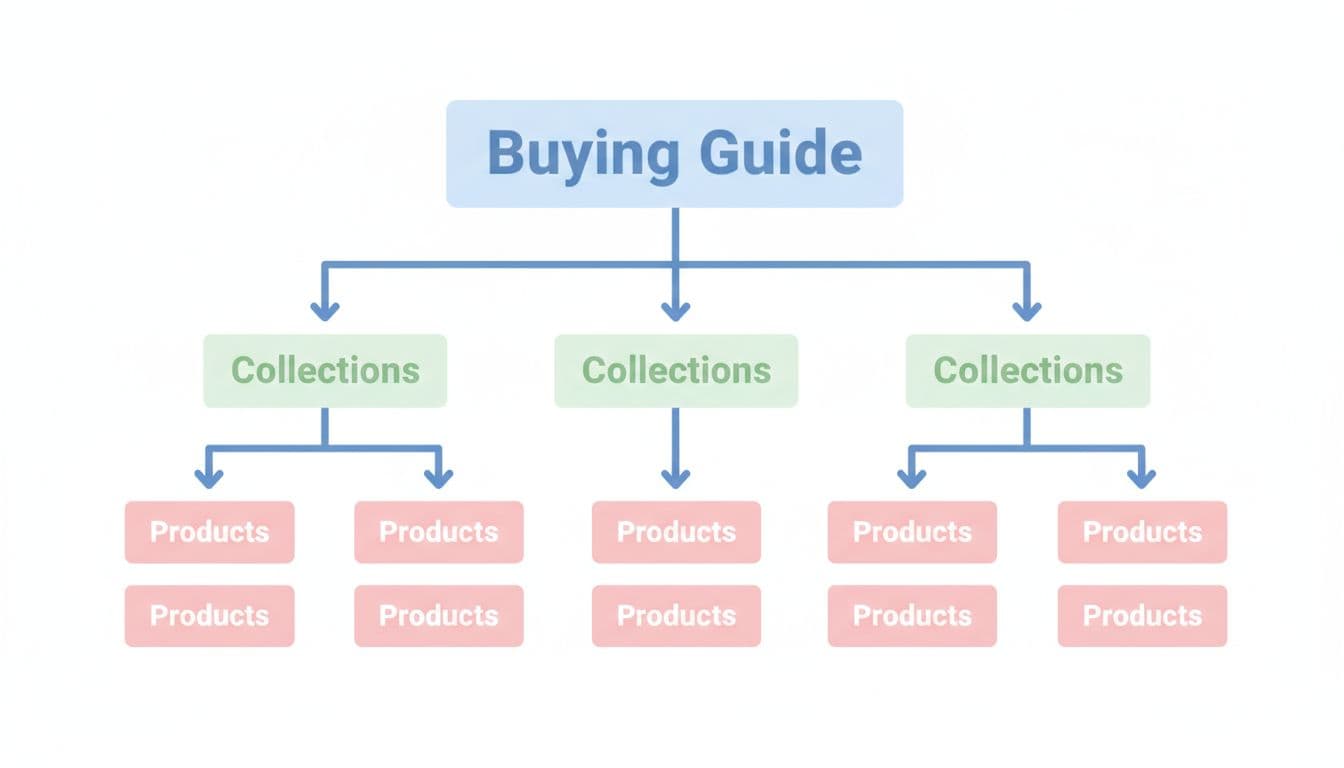
Send broad sections to collections, narrow sections to products
Most sections should link to collections before they link to products. That mirrors how people refine a choice. A section on arch support should point to the relevant collection or filtered category. Once the reader reaches a comparison block or “best for” module, direct product links make more sense.
Anchor text matters here. “Waterproof trail running shoes” is better than “shop now” because it carries meaning for both people and crawlers. The same rule applies across your site. This ecommerce internal linking strategy and internal linking advice for collection SEO both stress the same idea: links should match intent, not fill space.
Put links where doubt shows up
Readers click when a guide removes friction. So place links after sizing advice, material notes, compatibility warnings, and comparison tables. A buyer who just learned which outsole works on wet rock is ready for a filtered collection, not another paragraph.
The page layout should support that movement. Use jump links, short sections, clean headings, and compact product cards. On mobile, keep buttons easy to tap and avoid burying product links under long text. Breadcrumbs also help users backtrack into the catalog, and good breadcrumb navigation for SEO reinforces site hierarchy at the same time.
One more rule matters: don’t overload the guide with exact-match links to the same page. Vary anchors, limit duplicates, and link to the strongest next step. If the guide already pushed the user into a collection, let the collection page do the work of sorting products.
Final thought
Buying guides help revenue when they have a clear role. They should capture research intent, answer the questions that block a purchase, and pass readers into collections and products with links that fit the moment.
The strongest takeaway is page purpose. When each guide, collection, and product page owns a distinct intent, rankings get cleaner and shoppers move with less friction. Before you draft the next guide, map its destination pages first. The writing gets easier after that.