One wrong number can turn a wire or hose product page into a support ticket.
When buyers need a custom cut, they are not browsing casually. They are checking fit, length, reel limits, and price in one pass. Cut-to-length ordering UX has to support that task without making people think too hard.
If the page hides rules, the buyer hesitates. If it hides fees, the buyer loses trust. The best product pages make the order feel precise from the first field to the final summary.
Start with the buyer’s real order task
A B2B buyer usually comes to the page with one goal, place the right order fast. They may know the part number, but they still need to answer a few practical questions. How much length do I need? What unit is this sold in? Can it come from one reel, or does it need a split cut?
That is why the page should act like a purchase form, not a spec sheet with an add-to-cart button. The product photo and specs matter, but they should support the order flow. Length, increment, minimum, and reel status need to sit close together.
The buyer often works with a deadline. A maintenance tech may be replacing a failed line during a shift. A procurement manager may be trying to match an approved BOM. A distributor customer may be comparing options across multiple jobs. Each of them needs the same thing, clear rules and a fast path to confidence.
Make length input obvious and hard to misuse
Length entry should be the first thing the eye catches after the title and price. The field needs a plain label, a unit that never disappears, and a layout that works with both mouse and keyboard. If the page sells hose by the foot and wire by the meter, the unit selector should be tied directly to the input, not hidden in a side panel.
The best pattern depends on the product, but the field itself should always feel direct. A free-form length box works when buyers already know the exact figure. A stepper works when the product comes in fixed increments. A reel selector works when the order has to respect stock source or spool size.
The table below shows how the most common patterns compare.
| Input pattern | Best when | Watch out for |
|---|---|---|
| Free-form length field | Buyers know the exact cut length | Needs strict validation and unit labels |
| Stepper with increments | Orders must follow fixed cut rules | Can feel rigid if the step size is too large |
| Reel or spool selector | Length depends on stock source | Must show available lengths clearly |
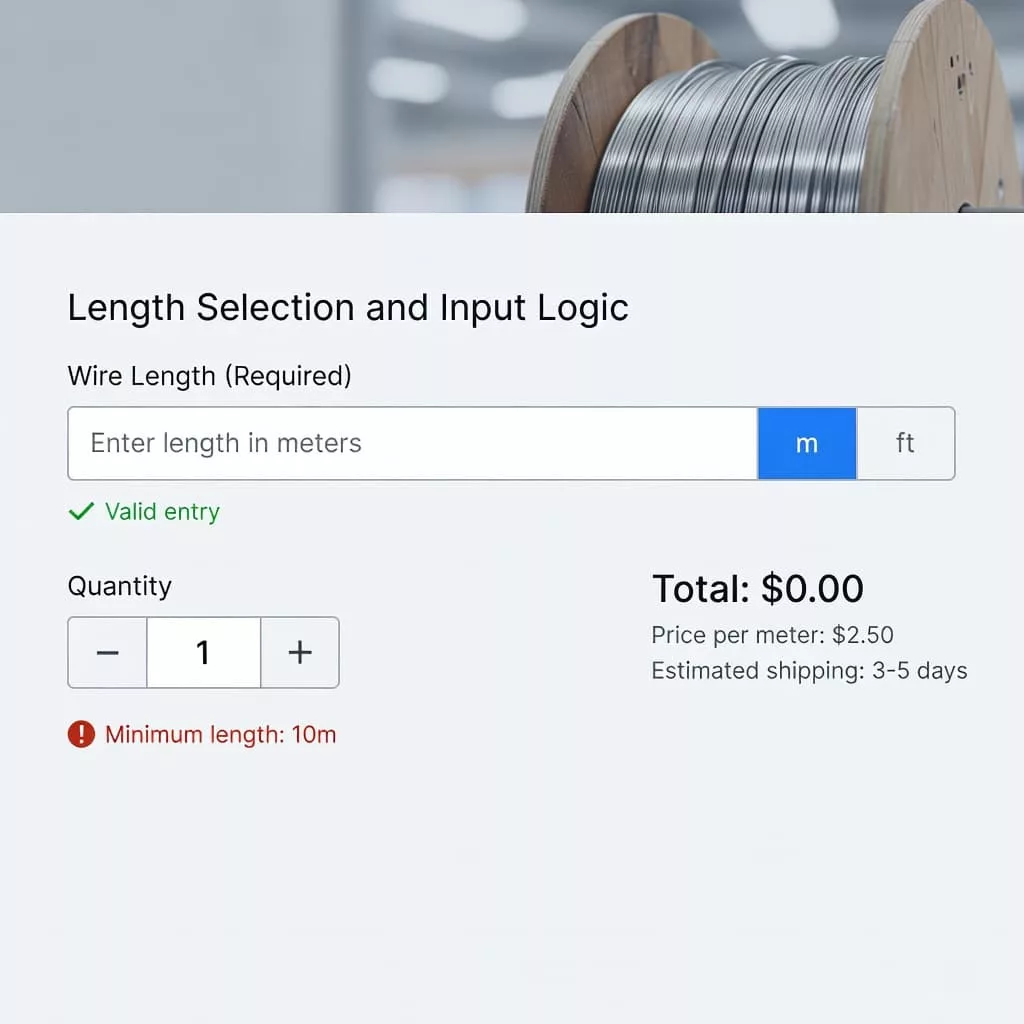
The right choice reduces hesitation before it starts. If the buyer understands how to enter length, they move faster and make fewer mistakes.
Buyers will accept strict rules when the page shows those rules before they type.
Match product rules to the actual stock system
Wire and hose catalogs often look simple on the surface, but the rules behind them are rarely simple. One item may require 10-foot increments. Another may have a minimum cut length. A third may only ship from a full reel until stock is opened. Those rules need to appear near the length field, not buried in the product notes.
Use plain helper text that tells buyers exactly what to expect. “Sold in 5-foot increments.” “Minimum order is 30 feet.” “Maximum continuous length is 250 feet per reel.” Those phrases do more work than a long block of policy copy.
This is also where the same logic behind B2B product configurator design matters. Every rule should be visible before the cart, because hidden constraints create costly rework later.
Separating quantity from length also helps. If the order is always one custom cut, do not ask for a generic quantity first. If the buyer can order multiple cuts, label each cut line with its own length and reel source. That keeps the mental model simple and the warehouse instructions readable.
When the rules are clear, buyers spend less time second-guessing the page and more time finishing the order.
Show price changes before the buyer adds to cart
Live price updates are one of the biggest trust builders on cut-to-length pages. As soon as the buyer changes length, the total should change too. That includes unit price, cut fee, reel surcharge, and any minimum-order adjustment. If the price only updates after add to cart, the page feels uncertain.
The display should make each cost legible. A buyer should see what part of the total comes from material, what part comes from cutting, and what part comes from packaging or reel handling. Hiding a cut fee in the line total may raise conversion for a minute, but it creates friction later when the customer checks the invoice.
A sticky order summary helps, especially on larger screens. On mobile, the summary can slide below the field but stay easy to revisit. Either way, the buyer should never lose sight of the current total.
The most useful summary fields are usually the same:
- Length selected, with unit
- Price per unit of length
- Cut fee, if one applies
- Reel or spool source
- Line total before tax and shipping
- Estimated lead time, if it changes by length
A clear summary gives procurement teams something they can review quickly. It also cuts down on “what exactly did I buy?” emails after the order goes through.
Prevent bad orders before they reach the cart
Good validation is quiet and firm. It should catch mistakes without making the buyer start over. If a user enters a decimal where only whole feet are allowed, the field should explain the rule in plain language. If the request exceeds the reel length, the page should say so right away. If a hose cut cannot be split across spools, that limit should appear before checkout.
Use field-level messages, not vague page alerts. The buyer should know what failed, why it failed, and what to change. Keep the original entry in place so the user can fix it fast. Erasing the number forces them to retype and increases abandonment.
Common validation states include:
- The requested length is below the minimum
- The length does not match the allowed increment
- The order exceeds one reel or spool
- The selected stock cannot support a single continuous cut
- The requested cut fee or handling rule changed the total
These checks protect operations as much as they protect conversion. A clean order page lowers the chance of wrong cuts, back-and-forth calls, and refund work. That matters when the warehouse has to move quickly and the buyer expects accuracy.
Give B2B buyers the proof they need to approve the order
B2B buyers often need more than a cart button. They need evidence they can pass along to a manager, a purchasing desk, or a shop supervisor. That means the page should show the part number, the selected length, the exact unit, and any cut or handling fee in a way that is easy to copy or review.
The product page can also support a few practical actions without getting crowded. A download for specs helps when a buyer needs to check compatibility. A request-for-quote path helps when the order is large or the length is unusual. A save-for-later option helps when the buyer is comparing several reels or hose assemblies.
The best pages keep the decision tree simple. If the buyer can place a standard cut order, that path should be obvious. If the item needs a quote because of minimums, custom handling, or stock limits, the page should say that early. Mixed signals cost trust.
Order summary clarity matters here again. A manager should be able to look at the page and understand the purchase without guessing what each field means. That is especially important for repeat orders, where the buyer expects the page to match the last purchase closely.
Conclusion
Cut-to-length pages work when they treat the order like a precise job, not a generic catalog action. Clear length fields, honest rules, live pricing, and strong validation give buyers the confidence to finish the order on the first pass.
That is the heart of cut-to-length ordering UX for wire and hose products. When the page matches how B2B buyers actually order, it sells more cleanly and creates fewer problems for the team behind it.