

Ecommerce keyword mapping assigns relevant queries to specific pages based on topic and search intent, giving each page its own keyword set. Your map should connect shoppers to the right destination, whether that’s a collection, an exact product, or buying advice.
When several URLs chase the same intent, useful pages can compete instead of supporting each other. Start with the language shoppers use, then choose the page that best completes their task.
Key takeaways
- Assign one primary query to each page, supported by closely related secondary queries.
- Match broad shopping searches to collections, exact product searches to products, and advice searches to useful content.
- Prioritize relevant pages already earning impressions, then resolve overlapping URLs before expanding the catalog.
1. Build your query inventory from store data
Keyword research tools help expand your list, but your catalog and customer behavior should shape it first.
Collect shopper language and seed keywords
A seed keyword is a broad starting term, often with high search volume. For example, “mobile phone” can expand into “buy mobile phone” and more specific product searches.
“Men’s shoes” is an example of short-tail keywords. “Men’s running shoes New York” is longer and more specific for a brand serving that market.
The query “men’s size 10 black leather Chelsea boots” is a high-intent long-tail keyword only when your store has a matching item and accurate variant details.
Combine these starting points with internal site search logs and customer support questions. They reveal buying language, compatibility concerns, and missing product attributes. Include zero-result searches too, because they expose gaps.
Recurring care questions can inform SEO content marketing guides, while compatibility questions can improve product details. Comparing competitor category and product pages with your catalog can reveal a competitor keyword gap: relevant queries they serve that your store doesn’t.
Use our internal search page SEO guidance to turn recurring demand into useful landing pages without indexing every search result.
Find opportunities in Google Search Console
For keyword analysis, open Performance > Search results > Pages, select a URL, then open Queries. Google’s Performance report documentation explains the metrics and filters.
Prioritize relevant queries with high impressions and low clicks, but inspect position too. Low visibility and poor click-through rate require different fixes.
For a leather-boots collection, filter its queries for “leather boots.” Then filter that query and inspect Pages to identify other landing URLs competing for it.

2. Group queries by intent, not matching words
Keyword research can generate candidate terms, while keyword clustering determines which searches one page can satisfy. Shared vocabulary helps, but the shopper’s task determines the cluster.
Compare the search results
Use SERP-based keyword clustering to compare the search engine result pages for each important query in the target country. Review the top 10 organic URLs and page types.
If two queries return the same top 10 results, group them together because they share search intent. Partial overlap can flag keyword cannibalization between competing destinations, but matching vocabulary alone doesn’t establish a problem. Compare the page formats and tasks the results serve: matching product grids suggest shopping intent, while matching tutorials suggest informational intent.
Don’t split synonyms into separate pages merely because a keyword tool lists them separately.
Resolve mixed intent before assigning a page
“Best leather boots” may surface editorial comparisons, retailer collections, or both. The dominant result format should guide your content strategy and fit your offer.
For mixed results, a curated collection can include brief selection advice while keeping product browsing central. A detailed comparison may warrant a separate guide.
Our ecommerce buying guide SEO approach explains how guides can support collections without duplicating their purpose.
Search volume alone shouldn’t choose the winner. The page’s content, inventory, and call-to-action must satisfy the query.
3. Choose the page type shoppers expect
Prioritize revenue-generating product and category pages. Map the homepage to the brand and broad store proposition. About Us should answer company questions, while Contact Us should address contact and support intent.
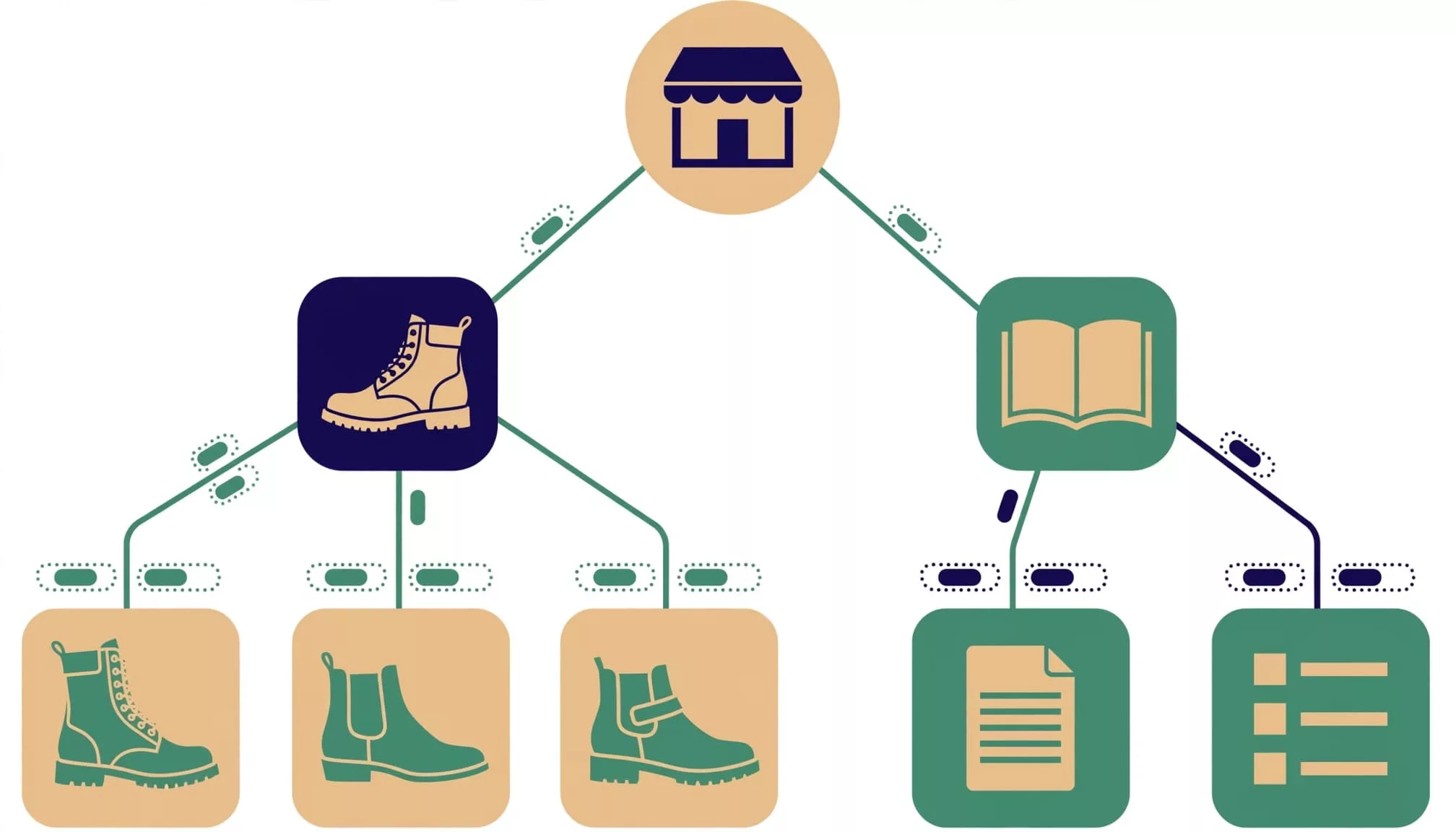
Use collections for broad shopping queries
Plural, broad keywords such as “leather boots” generally belong on category pages because shoppers expect a choice.
Narrower searches can justify subcategories when the store has enough relevant inventory. “Men’s black Chelsea boots” still suggests comparison across products, rather than one predetermined item.
Choose an existing collection when it already meets the need. Create a new one only when it offers a distinct selection and a stable role in navigation.
Use products for exact buying decisions
Highly specific searches such as “Men’s size 10 black leather chelsea boot” belong on a matching product page when the item and variant satisfy those attributes.
Exact brand, model, and manufacturer part number searches also fit product pages. Our manufacturer part number SEO guide covers identifier-led discovery.
The page must expose accurate size, stock, and compatibility details. Meanwhile, instructional searches such as “how to clean leather boots” belong on content pages that answer the question before recommending products.
4. Create an ecommerce keyword mapping sheet
A basic map needs keyword and destination-page columns. Add search volume and keyword difficulty when useful, but don’t let either override relevance.
Use this compact boot-catalog structure as a starting point.
| Page type | Primary query | Secondary queries | Intent | Cannibalization check |
|---|---|---|---|---|
| Category | leather boots | leather footwear, leather boot styles | Browse products | Separate men’s and women’s subcategories |
| Subcategory | men’s black Chelsea boots | black leather Chelsea boots for men | Compare products | Review competing filtered collections |
| Product | Blundstone 063 boots | Blundstone 063 black, 063 Chelsea boots | Buy exact model | Consolidate duplicate product routes |
| Guide | how to clean leather boots | cleaning leather footwear, leather boot care | Learn | Separate advice from shopping pages |
The distinction is the shopper’s task, rather than keyword length alone.
Add the actual destination URL, SKU or category ID, canonical target, indexability, owner, action, and priority. These fields keep the map connected to implementation.
Assign one primary query and start with roughly three to eight closely related secondary queries. That’s a practical organizing rule, not a Google limit. A page can rank for many more variations.
For on-page optimization, use the primary topic in the title, H1, and relevant copy. Include secondary language where it helps shoppers, without forcing every phrase into every element.
5. Control facets, variants, and seasonal collections
Large catalogs need mapping rules for URL classes, not individual decisions for every filter combination.
Promote a facet into an indexable landing page only when it has recurring demand, stable inventory, and distinct value. A useful color collection may qualify; stacked size, sort, and price parameters usually won’t.
For variants, keep one parent destination when differences don’t create separate search needs. Separate pages need meaningful differences, such as compatibility, specifications, imagery, or a distinct product offer. Preserve child-SKU accuracy for price and availability.
Google’s canonical URL guidance explains how to identify preferred duplicates.
A canonical tag suggests a preferred duplicate; it doesn’t prevent crawling. A noindex directive controls indexing, not URL generation.
Don’t block crawling of a URL that Google needs to access to see its noindex directive. Also control unnecessary parameter links and URL creation.
For recurring seasonal collections, retain a stable destination when it remains useful. Refresh inventory and content rather than creating another competing collection each season.
6. Resolve cannibalization and prioritize updates
Keyword cannibalization happens when two or more pages target the same keyword and compete in search results. In practice, shared intent and interchangeable content are stronger warning signs than shared words alone.
Find and fix overlapping destinations
To investigate keyword cannibalization, filter a query in Google Search Console, then inspect Pages. Look for overlapping category, brand, filtered, and product URLs. Repeated switching between similar destinations deserves investigation, especially when the wrong page appears.
Compare titles, product selections, copy, and calls-to-action. Two pages appearing for one query doesn’t automatically prove a problem.
When pages duplicate the same purpose, combine useful content into the strongest relevant destination and redirect the retired URL. Update your internal linking strategy by pointing links to the consolidated URL, removing links to retired routes, and updating sitemaps.
Keep genuinely different intents separate. A care guide and a boot collection can share terminology without requiring consolidation.
Rank work by commercial value and evidence
Fix indexing barriers and clear page-intent mismatches first. Next, improve relevant pages that fit your content strategy and have commercial value. Consider impressions, weak clicks, available inventory, and sales potential.
A specialist replacement part may deserve attention despite low search volume. Avoid deleting it simply because traffic is small.
Record each change and compare complete reporting periods, including year-over-year comparisons for seasonal categories. Google’s Performance report task guide supports page-level analysis.
Track query-page clicks, impressions, position, and CTR alongside landing-page purchases and revenue. Use Google Analytics to assess purchase and revenue data. Stable rankings with lower CTR suggest a different diagnosis than lost rankings.
Frequently asked questions
Do long-tail keywords always convert better?
No. ContentGecko’s summary reports roughly 25% conversion for long-tail keywords versus about 12% for short-tail terms. Treat those reported figures as context, not a forecast for your store.
Specific searches often reveal a clearer need, but conversion still depends on product fit, availability, pricing, and the shopping experience. A precise query is valuable only when your page can fulfill it.
Does AI search require a separate keyword map?
Keep one map organized around shopper intent. ContentGecko’s keyword research framework reports that 58% of US consumers use generative AI for product recommendations. It also cites 1,200% growth in AI-generated answer traffic between July 2024 and February 2025.
Those reported trends support clear product facts and useful buying guidance. They don’t justify creating duplicate pages for conversational versions of existing queries.
Give every search intent a clear destination
This approach works when each important shopper task has a useful page. Choose that destination before changing titles or publishing more content.
Start with one revenue-generating category. Map its queries, resolve competing URLs, and measure the surviving pages. A reliable query-to-page relationship is more valuable than a spreadsheet filled with keywords.