A shopper may tolerate a missing product detail, but a checkout that switches languages can end a purchase. A disciplined ecommerce translation workflow keeps every customer-facing touchpoint clear, accurate, and appropriate for the market.
Translation changes language. Localization changes how the store works for local buyers, including price display, measurements, payment language, shipping expectations, and search behavior. Start with a process that treats both as release work, not an afterthought.
Build an ecommerce translation workflow around markets
An ecommerce translation workflow needs a defined target market before anyone translates a word. “French” is a language, while “fr-CA” and “fr-FR” can require different vocabulary, currencies, tax messaging, measurements, and legal copy.
Translation and localization have different jobs
Translation converts source copy into another language while keeping its intended meaning. Localization adapts the experience for a specific audience.
For example, translating a US clothing page into French may produce usable text. A localized Canadian French page also needs local price presentation, delivery terminology, regional sizing guidance, and market-appropriate returns information.
Treat language, locale, and country as separate fields in your data model. Store language as a BCP 47 tag, such as en-GB or pt-BR, and keep country as its own value. This makes routing, formatting, reporting, and customer support far less fragile.
Give every stage an owner and a gate
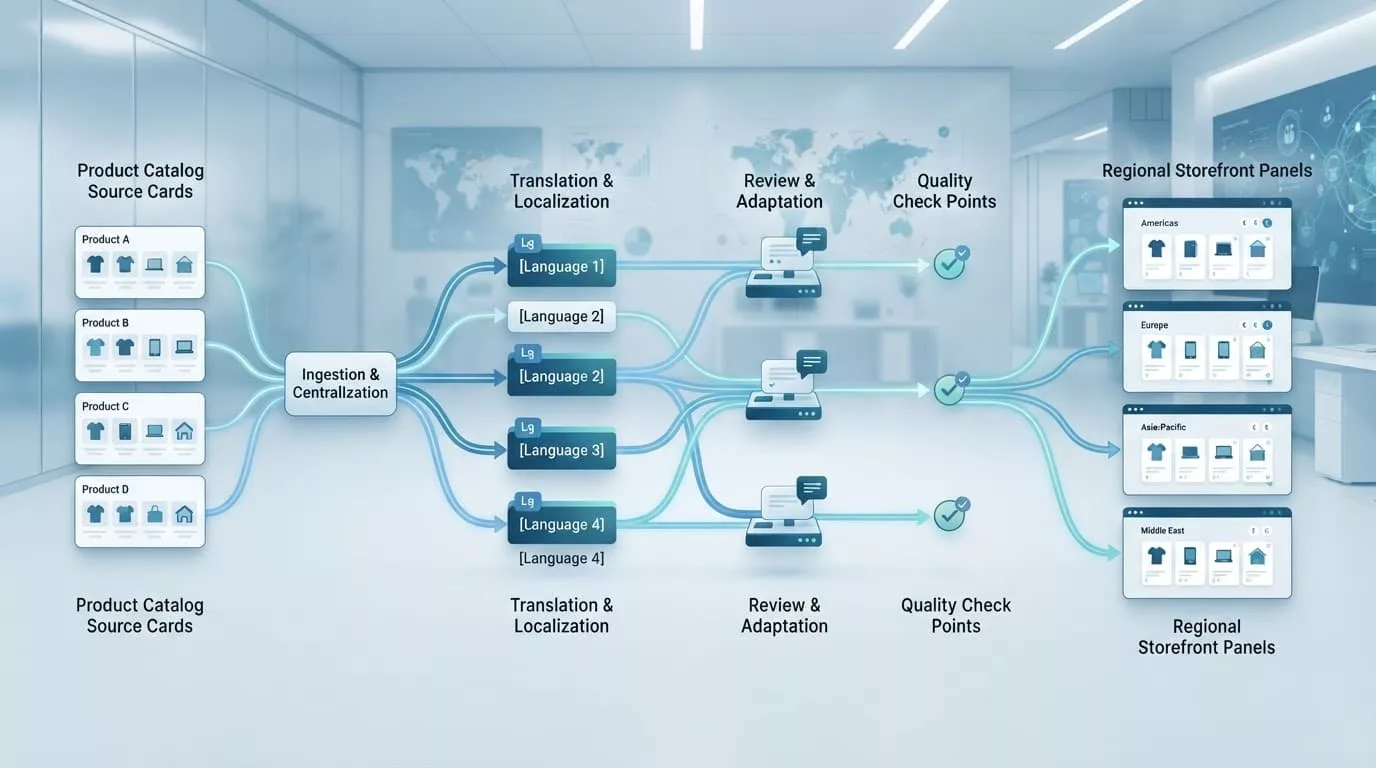
A practical release path has six stages:
- Market intake records the locale, catalog scope, channel, legal requirements, and launch date.
- Content preparation extracts approved source strings and locks SKUs, URLs, variables, and product facts.
- Translation and post-editing applies the glossary, style guide, and market notes.
- In-context review checks copy inside product pages, navigation, campaigns, and transactional messages.
- Functional QA tests currency, checkout, filters, links, search, and mobile layouts.
- Publishing and monitoring releases approved content and tracks defects, search visibility, and support issues.
A localization manager should own the queue. A market lead should approve brand and commercial fit. Legal or compliance owners should sign off on policies, warranties, tax notices, and regulated claims.
Create a source of truth for product content
Translation work breaks down when teams copy text from spreadsheets, screenshots, and live pages. Create one inventory of translatable content, then connect it to the CMS, PIM, ecommerce platform, and email system through APIs, exports, or managed files.
Separate structured fields from marketing copy
Keep source content attached to stable IDs. A translated product title should map to a product ID, not a row number that shifts after each export. Variants also need their own records, because “navy,” “medium,” and care instructions often appear in filters, carts, and order emails.
Use a content inventory that assigns responsibility before translation begins.
| Content group | Typical fields | Primary owner |
|---|---|---|
| Product data | Titles, descriptions, variants, specifications, image alt text | Merchandising |
| Store interface | Navigation, filters, errors, cart, checkout labels | Product or ecommerce team |
| Marketing | Landing pages, campaign copy, ads, loyalty messages | Marketing |
| Transactional and legal | Order emails, returns, privacy notices, warranties | Support, operations, legal |
This structure lets teams update a sale price without accidentally reopening a product description or a return policy.
Protect variables, terms, and reusable content
Lock placeholders such as {{ customer.first_name }}, {product_title}, HTML tags, and product identifiers before export. A translator needs to see surrounding context, but should never alter code, URLs, or merge fields.
Maintain a glossary for brand names, material terms, feature claims, category labels, and words that must stay untranslated. A translation memory then reuses approved phrasing across collections, emails, and support templates. That reduces repetitive work while keeping “free shipping,” “pre-order,” or “final sale” consistent.
Prioritize content that affects revenue and support
A full catalog translation can take months. A market launch doesn’t need to wait for every old blog post, but it can’t skip the pages that let customers buy, understand delivery, or request help.
Release high-risk content first
Start with the purchase path:
- Homepage messaging, primary navigation, category pages, product pages, search filters, cart, and checkout need complete localized coverage.
- Order confirmations, shipping updates, cancellation emails, password resets, and refund notifications should match the locale selected at purchase.
- Returns, privacy, terms, warranty details, customs notices, and consent language require legal review for each market.
Marketing content needs more freedom than product specifications. A campaign headline can be transcreated to match local search terms and tone. A capacity, ingredient, safety statement, or compatibility claim needs factual accuracy first.
Set a clear rule: native-language review is mandatory for purchase, support, and legal content. A market reviewer can approve a promotional concept, but legal text should never rely on marketing approval alone.
Use tiered scope to manage cost
Translate proven categories and high-traffic pages before long-tail content. Then schedule lower-volume collection pages, help articles, archived campaigns, and editorial posts in later batches.
This approach balances speed and cost without publishing partial checkout flows. It also gives teams real market data before they spend heavily on low-demand content.
Localize checkout details, not only store copy
Price, units, and delivery wording are part of the customer experience. A polished product page still feels foreign if a shopper sees unfamiliar size logic or payment instructions.
Format money, measures, and addresses by locale
Keep prices as structured market data. Do not hard-code currency symbols into translated sentences, because a symbol’s placement, decimal separator, and spacing vary by locale. Let the platform or application format the currency value after it receives the correct market and locale.
Convert measurements where customers expect it, such as centimeters and inches, kilograms and pounds, or milliliters and fluid ounces. Show a clear size conversion guide when sizing differs by region. Product dimensions, shipping thresholds, and delivery estimates also need local formats.
For more detailed implementation advice, use these localized ecommerce UX practices for currency, size, shipping, and locale preferences.
Review payment, shipping, and legal language in context
Translate every payment status, delivery option, address field, and validation message. Terms such as “postcode,” “collection,” “dispatch,” and “tax included” can carry different expectations across markets.
Also test whether the shipping methods shown are available in the selected country. A translated promise about free delivery causes damage if the rule doesn’t apply at checkout.
Legal content calls for a separate approval lane. Translators can produce the draft, but local counsel or an authorized compliance owner should approve consumer rights, refund terms, privacy language, cookies, and product restrictions.
Connect people, systems, and translation technology
The right tool depends on your stack, catalog size, and release frequency. The workflow matters more than a tool name because it defines what enters translation, who reviews it, and how approved copy returns to production.
Use platform capabilities without surrendering control
Shopify supports language and market configuration through international domains. Its localization and translation setup covers assigning languages to markets, while the Translate & Adapt app supports translation editing inside Shopify.
WooCommerce teams often manage storefront strings, pages, products, and extensions through separate components. Keep them on one release board so theme updates don’t leave checkout strings behind. Stores using the relevant extension can reference WooCommerce’s multilingual string translation documentation for its storefront string workflow.
For BigCommerce and custom builds, map every content type to a source system. Product data may live in a PIM, while CMS pages, promotions, and email templates live elsewhere. Use webhooks or scheduled exports to create change queues instead of asking translators to spot edits manually.
Treat machine translation as a draft, never a release decision
Machine translation can speed up first drafts, repeated catalog fields, and low-risk internal content. It doesn’t understand commercial intent, regulated claims, cultural references, or the space limits inside a button.
Use it with a glossary, protected variables, and human post-editing. Require a qualified reviewer for all customer-facing copy before publication. Product data with technical specifications may need subject-matter review as well.
Run localization QA before every release
Linguistic approval doesn’t confirm that the store works. QA needs a staging environment, representative customer accounts, localized test addresses, and real device checks.

Test the pages customers actually use
Run these checks for each locale and market:
- Compare product titles, variants, prices, images, and stock messages against the approved source data.
- Check buttons, menus, product filters, error states, discount messages, and empty states for truncation or untranslated text.
- Place test orders through cart, address validation, shipping selection, payment messaging, confirmation emails, and returns flows.
- Confirm currency formatting, unit conversions, date formats, tax messages, and delivery language.
- Review mobile layouts, right-to-left layouts where relevant, alt text, and the page language attribute.
A locale isn’t release-ready if its return policy, payment error, or stock message falls back to another language.
Publish only approved versions
Use status labels such as Draft, In Translation, Linguistic Review, Market Approval, QA Passed, and Published. A content change should create a new version rather than overwrite approved copy without notice.
Keep screenshots and test results with each release ticket. When a defect appears, the team can trace the issue to source content, translation, integration, or storefront rendering instead of guessing.
Include localized SEO in the release checklist
Search demand rarely follows literal translations. Local keyword research should guide category labels, product titles, metadata, and editorial topics for each market.
Build URLs and content around local intent
Give each language or region a stable, crawlable URL. Google recommends hreflang annotations for localized variations, as explained in its localized-version guidance. Pair each localized URL with accurate canonical tags and reciprocal alternate references.
Avoid forcing users to a market based only on IP address. Suggest a regional version, then allow customers to choose another language or country. For a deeper technical checklist, see international ecommerce SEO with hreflang.
Maintain accessibility and search signals
Set the correct lang value on each page and on embedded content that switches language. The W3C guidance on language declarations explains why this matters for browsers, assistive technology, and other user agents.
Monitor indexed pages, localized query terms, conversion rate, checkout errors, and support contacts by market. Those signals show where the ecommerce translation workflow needs a glossary update, better source content, or a technical fix.
Final thoughts
A multi-language store earns trust when its words, prices, policies, emails, and checkout behavior agree. Translation quality matters, but market-ready localization depends on structured data, clear ownership, and full-path QA.
Build the process around controlled releases rather than one-time translation projects. Each approved market then becomes easier to maintain when products, promotions, and policies change.