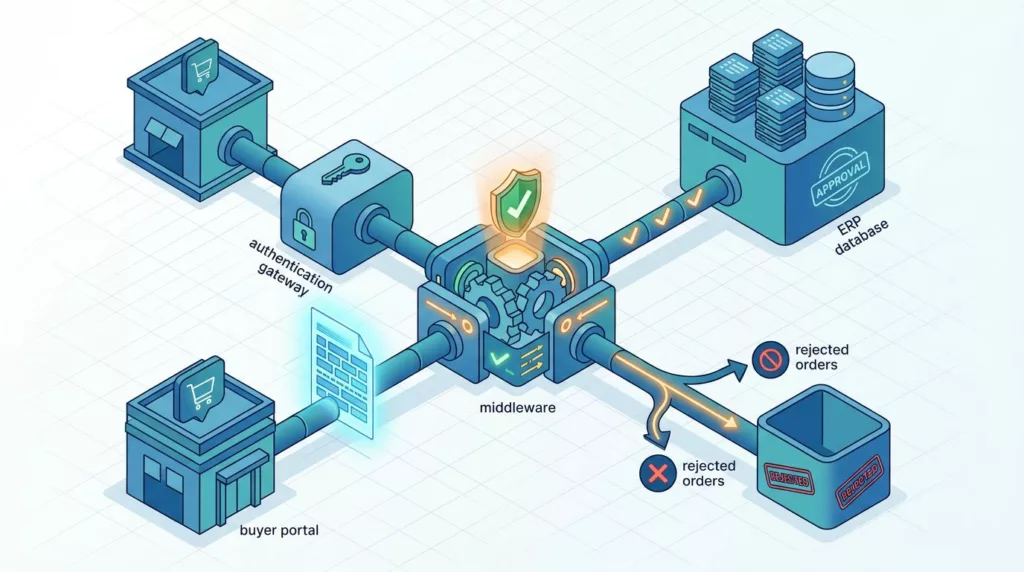
A purchase order can look correct in a buyer portal and still fail before it reaches the ERP.
Reliable cXML order testing checks more than XML syntax. It verifies the buyer profile, endpoints, authentication, business rules, middleware mappings, order response, and final ERP record.
The safest approach follows one order across every system, then repeats the flow with rejected, duplicated, delayed, and security-sensitive inputs. Start with the buyer’s approved contract before creating test cases.
Start cXML order testing with the buyer’s approved contract
cXML supports common procurement documents such as PunchOutSetupRequest, OrderRequest, OrderResponse, StatusUpdateRequest, ship notices, and invoices. However, buyers often support only a subset of these documents or add profile-specific requirements.
The cXML resource site describes the protocol’s role in communication between procurement applications, ecommerce hubs, and suppliers. The practical contract still comes from the buyer and its procurement platform.
Capture the version, profile, and endpoints
Record the exact details supplied by the buyer. Store them with the integration’s test plan and release configuration.
- Confirm the cXML version declared in messages and the DTD or schema location used by the buyer.
- Record the supported transaction types and profile values.
- Capture separate sandbox and production URLs for PunchOut, orders, responses, and status messages.
- Document the expected
deploymentMode, usuallytestorproduction, if the buyer requires it. - Record the authentication method, shared secret rules, client certificate requirements, and IP restrictions.
- Confirm response-time limits, retry rules, required headers, and conformance test scripts.
The official cXML Reference Guide includes material for cXML 1.2.071, while platform examples can contain older DTD declarations. Don’t switch versions because a newer one exists. Test against the version, profile, and conformance rules the buyer approved.
Define test data and system ownership
Create a controlled data set before testing. Include a real buyer account, supplier identity, contract price, tax treatment, ship-to address, bill-to address, currency, and at least two catalog items.
Each value needs an owner. The ecommerce platform may own the cart and customer-facing price. The ERP may own customer account numbers, inventory, tax codes, or order status. Middleware may own field transformations and message routing.
Document those decisions in the project’s B2B ecommerce integration requirements. Include the source of truth, expected format, update direction, and error owner for each important field.
Map the complete transaction across every system
An order test passes only when each system reaches the expected state. A valid OrderResponse doesn’t prove that the ERP accepted the order. An ERP record doesn’t prove that the buyer received the correct response.
Test the PunchOut handoff before the purchase order
If the buyer starts with PunchOut, test the session before testing the final order. The buyer typically sends a PunchOutSetupRequest, and the supplier creates a shopping session tied to the buyer’s identity.
The cXML PunchOutSetupRequest guide provides a useful reference for the opening document and its role in the flow.
Confirm that:
- The buyer reaches the correct supplier environment.
- The session identifies the correct customer account and user.
- Contract products, prices, units, and availability match the buyer’s account.
- The returned cart contains the expected item identifiers and quantities.
- Buyer-required fields, such as cost center or project code, survive the return.
- The buyer can create a requisition without losing line details.
Expired sessions, browser back-button use, unavailable items, and mixed carts need separate tests. A punchout integration testing checklist can complement the order-specific cases.
Trace the purchase order into the ERP
After approval, follow the OrderRequest through the ecommerce platform, integration middleware, order management service, and ERP. Record the identifiers at every hop:
payloadIDorderID- buyer requisition or purchase order number
- ecommerce order number
- middleware message ID
- ERP sales order number
The mapping should preserve customer identity, line references, quantities, units of measure, prices, tax, shipping, requested dates, and addresses. Compare the final ERP record with the original buyer document, not only with the transformed middleware message.
Also test the reverse path. Confirm that order acknowledgment, status, shipment, invoice, or exception information reaches the buyer when the approved profile supports those documents.
Prepare a safe and observable test environment
A strong test suite needs realistic boundaries without exposing production orders or credentials.
Separate test accounts, endpoints, and certificates
Use buyer-provided sandbox identities whenever they exist. Keep test credentials, shared secrets, certificates, callback URLs, and allowlists separate from production values.
Test the complete TLS connection rather than checking only a configuration screen. Verify the hostname, certificate chain, certificate expiration, client certificate behavior, and the endpoint that the middleware actually calls.
If the buyer supports only production validation, obtain written approval for test order numbers, test accounts, cancellation procedures, and cleanup. Don’t send an ordinary test order through a live fulfillment process.
Platform setup differs. For example, Microsoft documents cXML enhancements and test configuration for Dynamics 365 procurement workflows in its Purchasing cXML documentation. Treat those settings as platform guidance, not as universal cXML behavior.
Capture evidence without exposing secrets
Log enough information to reconstruct a failure:
- request and response timestamps
- endpoint name and environment
- HTTP status
- cXML
Statuscode and text payloadIDandorderID- middleware correlation ID
- validation result
- ERP response or rejection reason
- retry count and next retry time
Redact shared secrets, client private keys, authorization headers, payment data, and unnecessary personal information. Store raw documents in a restricted test workspace with retention rules.
A test run should produce evidence that another engineer can inspect. Screenshots alone don’t prove field-level accuracy.
Run positive cXML order testing scenarios
Positive tests establish the expected path before you test failures. Use a known buyer account and compare every result with an approved expected document.
Start with a clean new order
Submit a basic OrderRequest with one valid item and one ship-to address. Confirm that the receiver:
- parses the XML successfully
- validates the buyer and supplier identities
- checks the shared secret or certificate
- matches the catalog item
- calculates the expected line and order totals
- creates one ecommerce and one ERP order
- returns the required
OrderResponse - records the correct order status
Check the response body as well as the HTTP status. cXML uses a Status element to carry the outcome of a request. A transport-level success can still contain a business rejection.
The response must also meet the buyer’s timing requirement. Coupa’s supplier documentation says suppliers should return an OrderResponse within 60 seconds for each OrderRequest, but another platform may set a different limit. Verify the target buyer’s rule before writing a shared assertion.
Add real B2B order complexity
Repeat the flow with values that occur in production orders. Include multiple lines, customer-specific pricing, decimal quantities if supported, shipping charges, tax, requested delivery dates, comments, and buyer Extrinsic fields.
Test both a standard new order and any supported update or change order type. Coupa documents support for OrderRequest types such as new and update, but that behavior shouldn’t be assumed for another buyer.
Use line-level comparisons. The following values often appear correct at the cart stage but change during mapping:
- supplier item ID versus buyer item ID
- unit price versus extended price
- ordered unit versus stocking unit
- requested quantity versus allocated quantity
- buyer line number versus ecommerce line number
- tax-inclusive versus tax-exclusive totals
A passing test preserves these distinctions through the ERP handoff.
Test negative and boundary cases deliberately
A production integration needs predictable rejection. It must refuse invalid documents before they create partial orders or misleading acknowledgments.
Separate syntax errors from business errors
Test malformed XML, an invalid character encoding, missing required elements, an incorrect namespace, and an unsupported cXML version. Then test valid XML with invalid business data.
Useful rejection cases include an unknown supplier identity, wrong buyer domain, invalid shared secret, missing ship-to address, inactive customer account, unknown SKU, unsupported unit of measure, invalid currency, expired contract price, and mismatched totals.
For each rejection, verify four outcomes:
- The sender receives the expected error format and status.
- Middleware records a clear, actionable reason.
- The ecommerce platform doesn’t create a partial order.
- The ERP doesn’t receive a misleading order or duplicate retry.
Don’t treat every error as retryable. Authentication failures, schema errors, and invalid business data usually need correction. A temporary ERP outage may need a retry or a business exception queue.
Test field limits, rounding, and unusual characters
Boundary tests expose assumptions hidden in field mappings. Test the shortest and longest accepted values for addresses, names, comments, item IDs, and extrinsic values. Include empty optional values and absent required values.
For numeric fields, test quantity one, the maximum permitted quantity, zero, negative values, supported decimal precision, large prices, and rounding at line and order level. Confirm that the same rounding rule applies in the ecommerce platform, middleware, buyer system, and ERP.
Use XML-sensitive characters such as &, <, and > in approved text fields. Include non-ASCII characters when the buyer accepts them. Verify correct escaping, UTF-8 handling, and display in the ERP.
Dates need boundary tests too. Check time zones, midnight, daylight-saving transitions where relevant, and invalid date formats. A requested delivery date that shifts by one day can create an operational failure even when the XML validates.
Test retries, duplicates, and timeouts
A failed network call doesn’t reveal whether the receiver created the order. Your integration needs a clear idempotency strategy before automated retries begin.
Keep identifiers stable across retries
Use a stable payloadID for the same document when the buyer’s guidance requires it. The cXML reference material recommends keeping that identifier unchanged across retry attempts. Store it with the order and middleware message record.
Test these cases separately:
- the first request times out after the receiver creates the order
- the receiver returns a temporary server error before processing
- the same payload is delivered twice
- the same
orderIDarrives with different line data - two legitimate orders use different payload IDs
- a retry arrives after the order has moved to fulfillment
The receiver should detect duplicates without creating a second ERP order. It should return the buyer-accepted response for an already processed message or place the message in a controlled exception state. The exact response depends on the buyer profile.
Verify retry policy and timeout recovery
Coupa’s cXML purchase-order documentation describes 2XX responses as successful, 4XX responses as errors that won’t succeed through retry, and 5XX responses as errors that trigger five retries at one-hour intervals. Other platforms may use different schedules, limits, or retry ownership.
Test the configured behavior instead of copying Coupa’s policy into a generic framework. Simulate slow ERP responses, unavailable middleware, closed connections, DNS failures, and delayed buyer callbacks.
A timeout test must check both sides. Confirm the sender’s retry decision, then confirm whether the receiver completed the original transaction. Otherwise, a safe retry can look like a duplicate order.
A timeout is a state-uncertainty problem, not proof that no order exists. Query the receiver by
payloadIDor order reference before replaying the message.
Verify transport and message security
Security tests belong in the integration suite because procurement messages contain customer, pricing, address, and purchasing data.
Validate certificates and authentication
Confirm that the endpoint uses HTTPS and that the certificate matches the configured hostname. Test expired certificates, an untrusted chain, a wrong client certificate, and a certificate rotation in the sandbox.
Where the buyer uses a shared secret, test an incorrect value, missing value, whitespace changes, and secret rotation. Verify that the receiver rejects invalid credentials before it creates an order.
SAP Ariba setup supports shared-secret authentication and can also accept a signed client certificate in the cXML configuration. Its setup guidance requires an externally accessible HTTPS profile URL. Those requirements belong to that platform configuration, so confirm the buyer’s exact setup.
Protect XML processing and operational logs
Configure the XML parser to reject unsafe external entity resolution when the platform supports that control. Test oversized documents, excessive nesting, unexpected attachments, and invalid entity references. The goal is to prevent parser abuse without breaking approved cXML documents.
Check access controls around message logs, replay tools, certificates, and test customer data. A support user may need to see an error reason without seeing a shared secret or private key.
Security assertions should include both acceptance and rejection. A valid certificate must reach the intended endpoint, while an invalid certificate must stop the transaction and create an auditable failure.
Turn the checklist into automated tests
Manual QA is useful for buyer acceptance and visual workflow checks. Automation gives the team repeatable coverage after every mapping, catalog, middleware, or ERP change.
Build tests at several layers
Start with contract tests that validate required elements, data types, namespaces, allowed codes, and cXML version rules. Use XPath or equivalent XML assertions to check exact values, not only whether a document parses.
Next, test mapping functions with fixtures for addresses, quantities, prices, taxes, units, account IDs, and extrinsic fields. Include both valid and rejected fixtures. Keep expected output under version control so changes receive code review.
Then add service-level tests for authentication, endpoint routing, response timing, retry behavior, and idempotency. Use a stub buyer or ERP where a real platform isn’t available, but label those results as simulated.
Assert business outcomes across systems
An automated test should fail if the message is structurally valid but the ERP record is wrong. Assertions can check:
- one buyer order maps to one supplier order
- every source line has one destination line
- totals reconcile within the approved rounding rule
- the customer account matches the buyer identity
- duplicate delivery creates no additional ERP order
- a rejection leaves no open order
- a status update references the original document
- logs contain correlation IDs without secrets
Run fast contract and mapping tests on every commit. Run sandbox end-to-end tests on integration changes, and run buyer conformance tests before a release.
Use a practical cXML test-case matrix
The matrix should name the input, expected response, and cross-system evidence. Adjust the details marked as buyer-specific to the approved platform profile.
| Case | Test input | Expected result | Evidence to capture |
|---|---|---|---|
| Positive | Valid new OrderRequest with one item | Accepted response within the buyer’s time limit, one order created | cXML response, ecommerce ID, ERP ID |
| Negative | Missing required identity or line field | Clear rejection, no order created | Error code, middleware log, database check |
| Boundary | Maximum quantity, long address, decimal price, special characters | Accepted or rejected according to documented limits | Parsed values, rounding result |
| Retry | Temporary 5XX, closed connection, or middleware outage | Retry follows the buyer’s configured policy | Retry count, timestamps, stable payload ID |
| Duplicate | Same payload delivered twice | One business order, controlled duplicate response | Idempotency record, ERP count |
| Timeout | Receiver processes after sender timeout | Recovery checks existing state before retry | Receiver audit, retry decision |
| Security | Invalid secret, expired certificate, wrong hostname | Authentication fails before order creation | TLS and auth logs, no secret exposure |
| End to end | Valid order with buyer-specific price, tax, and ship-to | Matching records across buyer, commerce, middleware, and ERP | Field comparison report |
| Status | Approved status or StatusUpdateRequest | Buyer sees the supported status transition | Original payload reference, status history |
Run each case with a unique test label. Keep the original request, response, timestamps, and expected result together so a failed run can be reproduced.
Diagnose common cXML failures with correlation evidence
Most integration failures become easier to isolate when the team separates transport, XML, business, and downstream stages.
Read the response at every layer
An HTTP 4XX often points to an endpoint, authentication, or request validation problem. A 5XX may indicate a temporary service or downstream failure. Neither interpretation is universal, so use the buyer’s documentation and logs.
A response with HTTP success can still contain a cXML Status error. Inspect the status code, text, and response body before marking the test passed.
Common symptoms have different likely causes:
- The buyer never receives a response. Check DNS, TLS, firewall rules, endpoint routing, and timeout settings.
- The receiver rejects the message as invalid XML. Compare the namespace, encoding, required elements, and version declaration with a passing fixture.
- The order is accepted but no ERP order appears. Check middleware routing, customer-account mapping, SKU cross-reference, UOM conversion, tax validation, and ERP queues.
- The ERP order exists with wrong totals. Compare raw buyer values with transformed values at each handoff, including decimal precision and currency.
- A retry creates two orders. Inspect idempotency storage, transaction timing, payload ID persistence, and the boundary between acknowledgment and ERP commit.
- Status never changes. Confirm the status document type, original payload reference, polling or delivery schedule, and buyer-specific state rules.
The cXML release notes help teams check whether a document type or status feature belongs to the version under test.
Use a repeatable triage sequence
When a test fails, first preserve the raw request and response. Record the correlation IDs, environment, endpoint, certificate version, and exact test data.
Next, compare the failure with the last known passing fixture. Identify the first system where a value changes or disappears. Then check whether the failure occurred before acknowledgment, after acknowledgment, or during ERP processing.
Finally, fix the owning layer and rerun the smallest useful test. Use a fresh test order for a new transaction. Use the original payload ID only when testing an actual retry or duplicate case.
Set clear exit criteria before go-live
A buyer should approve the integration against its own profile, not against a generic XML validator.
Complete buyer acceptance
Collect written confirmation for the tested cXML version, profile, endpoints, authentication method, certificate chain, response timing, retry behavior, supported order types, status documents, and required fields.
The acceptance set should include at least one positive order, one rejected order, one duplicate or retry case, one boundary case, and one complete PunchOut-to-ERP flow when PunchOut is part of the implementation.
Record known limitations. If a buyer doesn’t support order updates, decimal quantities, status callbacks, or a particular extrinsic field, document the decision rather than leaving it implicit.
Run a controlled production smoke test
After deployment, verify endpoint reachability, certificate selection, authentication, request routing, and response logging with the buyer’s approved smoke-test procedure.
Monitor the first production messages for response time, rejection rate, duplicate detection, ERP creation, and status progression. Keep a rollback or queue-pause procedure ready if the buyer reports incorrect orders.
The integration is ready when the same identifiers, values, and business outcomes remain consistent across the procurement system, ecommerce platform, middleware, and ERP.
Conclusion
Effective cXML order testing follows the purchase order beyond XML validation. It checks the buyer’s approved version and profile, exercises PunchOut and order flows, confirms security and timing, and verifies the final ERP result.
Build automated coverage for positive, negative, boundary, retry, duplicate, timeout, and security cases. Pair it with manual buyer acceptance and production smoke testing. When every system can explain the same order through one correlation chain, procurement integrations become much easier to release and support.