
A Magento category page is like the aisle sign in a big store. If it’s clear and helpful, shoppers find what they want fast. If it’s vague, thin, or duplicated across the site, search engines and people both wander.
In January 2026, Magento category SEO is less about small tweaks and more about control: helpful category content, fewer wasted crawl paths, and tighter duplication rules. The biggest threats are usually the same three: thin category copy, layered navigation creating thousands of near-clones, and multiple pages competing for the same intent.
Fix thin category content (without pushing products below the fold)

Start by judging your category pages like a shopper would. If the top of the page is only a heading and a product grid, Google sees a template, not a destination.
In Magento (Open Source or Adobe Commerce), the easiest wins usually come from category-level content and consistent metadata:
- Add a short intro above the grid (often 100 to 250 words). Use plain language, name the main product type, and clarify who it’s for. Keep it scannable.
- Use Page Builder or CMS blocks to place content modules without bloating the layout. A “How to choose” module under the grid often converts better than a wall of text above it.
- Align SEO title and H1 so they match the actual category intent. If the H1 says “Shoes” but the title targets “Men’s Trail Running Shoes,” you’re sending mixed signals.
- Write unique category copy. Copy-paste descriptions across sibling categories is a fast way to make everything look the same.
If you need a Magento-specific refresher on what the platform supports out of the box, this Magento 2 SEO features overview is a useful reference for settings and common pitfalls.
How to test, fast:
- In Screaming Frog or Sitebulb, sort category URLs by word count and near-duplicates.
- In Google Search Console, check Performance for each category. If impressions are high but clicks are weak, your snippet and intent match might be off.
Layered navigation and filter URLs: decide what deserves to be indexed
Layered navigation is great for shoppers and risky for crawl efficiency. Every filter combination can become a “new page,” even when it adds no unique value. That’s how index bloat happens, your site turns into a junk drawer of low-value URLs.
Your goal for 2026: keep filtering for users, but keep indexing for only the pages that stand on their own.
Here’s a practical decision table you can use:
| Page type | Example pattern | Index? | Canonical | Meta robots |
|---|---|---|---|---|
| Main category | Clean category URL | Yes | Self | index,follow |
| High-demand combo | Purpose-built landing page | Yes | Self | index,follow |
| Typical filtered page | ?color=red&size=10 | No | Main category | noindex,follow |
| Sort and view params | ?product_list_order=price | No | Main category | noindex,follow |
Magento-specific ways to implement this cleanly:
- Canonical pattern: filtered URLs should point back to the clean category URL (no parameters). Make sure canonicals don’t point to redirected URLs.
- Meta robots for filtered pages: serve
noindex,followwhen query parameters are present (theme logic or a small module is usually safer than manual edits). - Robots.txt guardrails (use carefully): block obvious crawl traps while still letting Google reach products. Example patterns you might discuss with devs include
Disallow: /*?*product_list_order=andDisallow: /*?*product_list_limit=. Don’t block something you also want canonicalized and audited. - XML sitemap discipline: keep filter URLs out of sitemaps. In Magento, review sitemap generation under Marketing, SEO and Search.
For broader 2026 context on crawl waste and AI-driven search surfaces, this eCommerce SEO 2026 strategy article frames why “less but better” pages win more often now.
How to test it:
- Use server logs to see what Googlebot hits most. If filter URLs dominate, you’re burning crawl on junk.
- In GSC Indexing, look for “Duplicate” and “Crawled, currently not indexed” spikes on parameter URLs.
Fix cannibalization between categories, subcategories, and “SEO filter pages”
Cannibalization is what happens when you stock the same shelf in three aisles. A parent category, a child category, and a filtered URL all try to rank for the same intent, then none of them wins.
Common Magento patterns that cause it:
- Parent and child categories share the same naming style and copy, just swapped words.
- Filter URLs get indexed and start competing with the main category.
- Products and categories use overlapping titles (and the category has no unique context).
Clean fixes that don’t require a rebuild:
- Assign one intent per level: parent categories stay broad, child categories go specific, and products answer the “which exact item” query.
- Use URL rewrites for consolidation: if you created “SEO filter pages” in the past, decide which should become real landing pages and 301 the rest. (Admin path: Marketing, SEO and Search, URL Rewrites.)
- Strengthen internal signals: breadcrumbs should reflect hierarchy, and category intro copy should mention what makes that category different (materials, use case, fit, compatibility).
If you want more Magento-focused ideas for 2026 positioning, this Magento SEO 2026 guide has good examples of how stores separate category intent from product intent.
How to test cannibalization:
- In GSC Performance, filter a single query, then check if multiple category URLs rotate for it.
- In a crawl tool, compare H1 + title + canonical across category and filtered URLs. If they’re the same, you’ve built competitors.
Technical checks that protect crawl efficiency and category rankings
Technical issues don’t just slow pages down, they also change which URLs get crawled, indexed, and trusted.
A tight 2026-focused audit for Magento category pages:
- Indexability basics: confirm categories return 200 status, aren’t blocked by robots, and don’t set
noindexby mistake after a theme update. - Pagination and infinite scroll: make sure paginated category pages have crawlable links. If you use infinite scroll, include a paginated fallback so products aren’t hidden from bots.
- Performance: category pages are heavy. Full-page cache, image format (WebP or AVIF), and extension sprawl matter. Treat Core Web Vitals as a category-page project, not just home page polish.
- Sitemaps: ensure only index-worthy categories are included, and that the lastmod dates actually change when categories change.
For a deeper technical punch list, compare your setup against a Magento 2 technical SEO checklist.
How to test quickly:
- Run a JavaScript-rendered crawl for category templates (to catch hidden content and lazy-load issues).
- Use GSC URL Inspection on a clean category URL and a filtered URL, confirm Google-selected canonical matches your intent.
Downloadable-style checklist recap (copy into a ticket)
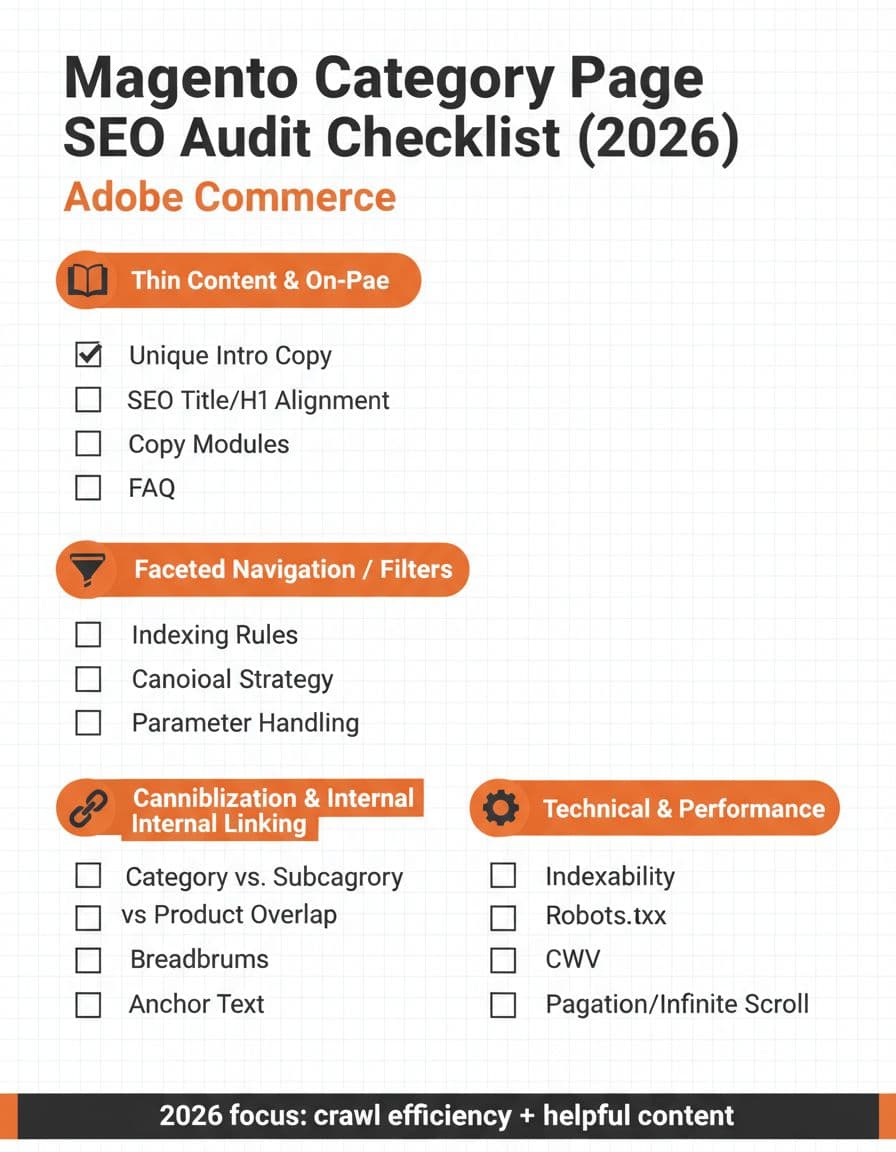
- Category has unique intro copy (not reused on siblings)
- SEO title, H1, and on-page wording match the same intent
- Helpful modules exist (FAQ, sizing guide, comparison, shipping notes)
- Filter URLs are not in XML sitemaps
- Filtered pages use canonical to the clean category URL
- Filtered pages use
noindex,follow(unless they’re real landing pages) - Sort and view parameters are controlled (no indexing)
- Parent and child categories don’t target the same query
- URL rewrites consolidate duplicates and retire old “SEO filter pages”
- Logs confirm Googlebot spends time on categories and products, not filters
- Category pagination stays crawlable, even with infinite scroll
- Category templates pass Core Web Vitals checks
If you only fix one thing this quarter, fix index bloat from filters. Magento category SEO improves fast when search engines stop wasting time on near-identical URLs, and shoppers land on pages that actually help them choose.